
A reliable internet connection is an important part of watching television and video content online. Whether you use a Smart TV, streaming device, smartphone, tablet, or computer, your connection can affect picture quality, buffering, and overall playback stability.
But how much internet speed do you actually need for IPTV streaming?
The answer depends on several factors, including video resolution, the number of devices using your connection, Wi-Fi performance, and the quality of the streaming service.
In this guide, we’ll explain the main factors to consider when choosing an internet connection for IPTV and other internet-based television services.
What Internet Speed Does IPTV Need?
There is no universal internet-speed requirement for every IPTV service.
Different services can use different video codecs, bitrates, resolutions, and delivery systems. Your household’s internet usage also makes a significant difference.
As a general starting point, higher-quality video requires more bandwidth. A household watching one HD stream has very different requirements from a household simultaneously watching several streams while gaming, making video calls, or downloading files.
The FCC has highlighted that households using multiple devices simultaneously can require substantially more bandwidth than a single-device household.
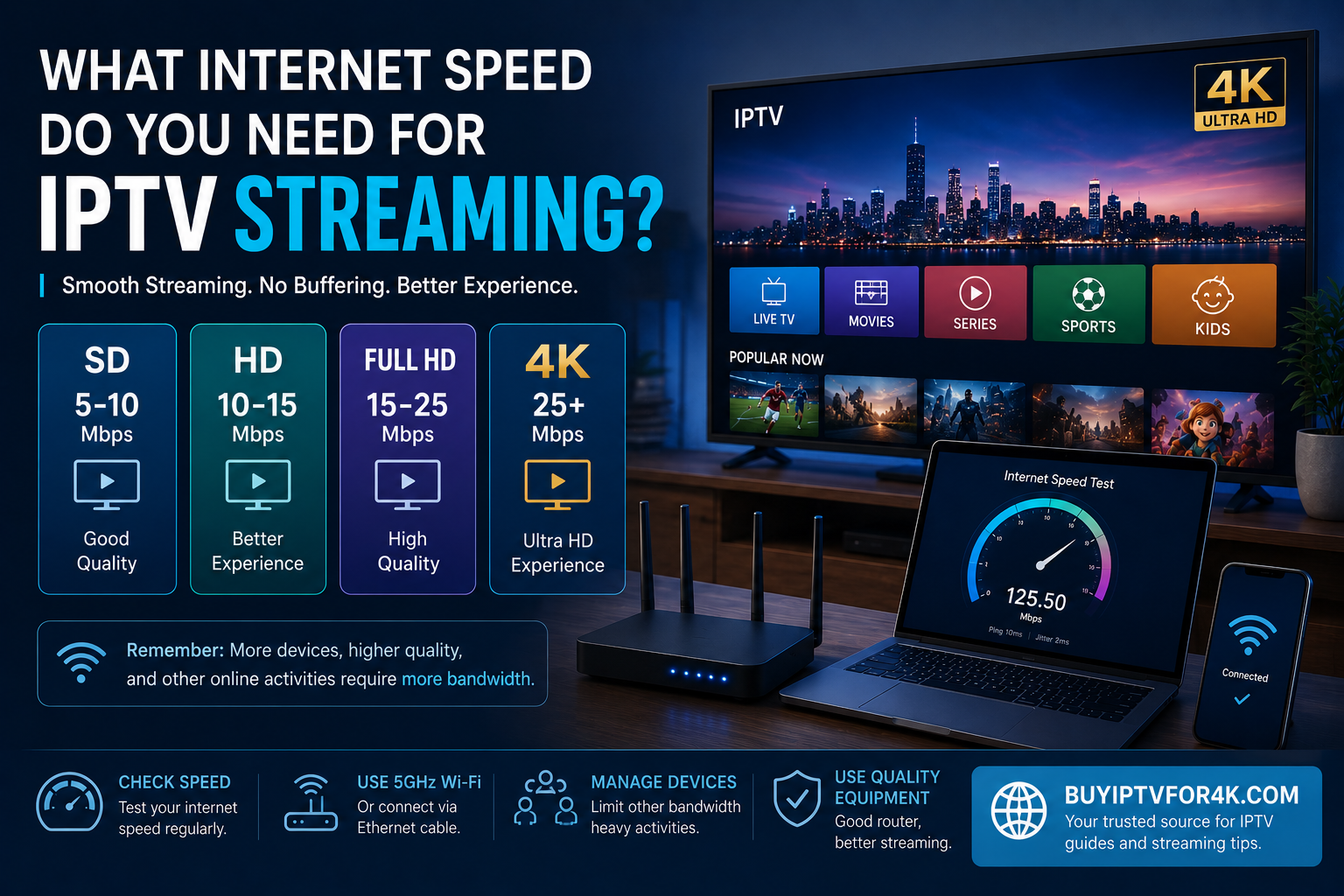
Recommended Internet Speed for Different Video Qualities
The following figures are useful general guidelines, rather than guaranteed requirements for every IPTV service:
| Video quality | Practical starting point |
|---|---|
| SD | 5–10 Mbps |
| HD | 10–15 Mbps |
| Full HD | 15–25 Mbps |
| 4K / UHD | 25 Mbps or more |
Actual requirements can vary depending on the stream, compression technology, network conditions, and other devices connected to your network.
For comparison, Netflix currently recommends a stable connection of at least 3 Mbps for HD, 5 Mbps for Full HD, and 15 Mbps for 4K UHD on its own service. These figures should not be treated as universal IPTV requirements, but they demonstrate how video quality affects bandwidth requirements.
Is 10 Mbps Enough for IPTV?
A 10 Mbps connection can be enough for some basic streaming situations.
However, your available bandwidth is shared by the devices in your home.
For example, if one television is streaming while another person is:
- Playing an online game
- Attending a video call
- Downloading a large file
- Watching another video stream
- Using cloud applications
the connection may have considerably more work to handle.
Therefore, don’t judge your connection only by its advertised download speed.
Is 25 Mbps Enough for IPTV?
For many households, 25 Mbps can provide a reasonable starting point for HD or Full HD streaming.
However, the actual experience depends on what else is happening on the network.
If you are the only person using the connection, 25 Mbps may provide plenty of capacity for ordinary streaming. If several people are using demanding applications simultaneously, you may benefit from a faster connection.
What About 4K IPTV Streaming?
4K video requires more data than lower-resolution video, although the exact bandwidth requirement varies depending on compression and bitrate.
Netflix, for example, recommends at least 15 Mbps for 4K UHD on its platform.
For IPTV and other streaming services, having additional bandwidth beyond the minimum can provide more room for other household activities.
A good 4K setup includes:
- A 4K-capable display
- A compatible streaming device
- A suitable application
- 4K content
- A stable internet connection
Having a 4K television alone does not guarantee that the content you watch will actually be delivered in 4K.
Download Speed vs Upload Speed
For normal IPTV viewing, download speed is generally more important than upload speed because the video data is being delivered from the service to your device.
Upload speed becomes more relevant when you are simultaneously:
- Uploading large files
- Using cloud backups
- Making video calls
- Broadcasting live content
- Performing other upload-intensive activities
For ordinary viewing, focus primarily on download performance and connection stability.
Why Can IPTV Buffer With Fast Internet?
A fast broadband plan does not automatically eliminate buffering.
Several factors can cause playback interruptions.
Weak Wi-Fi Signal
Your internet plan might provide high speeds, but your television could receive a weak Wi-Fi signal because of distance, walls, interference, or router placement.
Network Congestion
Several devices sharing the same connection can consume available bandwidth.
Router Problems
An outdated or poorly positioned router can affect your home’s wireless performance.
Device Performance
Older Smart TVs or streaming devices may have difficulty processing certain high-resolution formats.
Service-Side Issues
Sometimes the problem is outside your home network. Temporary issues affecting the streaming service or content delivery infrastructure can also affect playback.
Wi-Fi vs Ethernet for IPTV
If your router is close enough to your television or streaming device, an Ethernet connection can be worth considering.
A wired connection can provide a more consistent connection than Wi-Fi, particularly when the wireless signal is weak or the environment contains significant interference.
Wi-Fi can still work very well with a modern router and strong signal.
If you experience buffering, compare the experience over Wi-Fi and Ethernet when possible. This can help determine whether your wireless network is contributing to the problem.
How Many Devices Can Use IPTV at Once?
There is no universal number.
It depends on:
- Your available bandwidth
- Video resolution
- Number of simultaneous streams
- Online gaming
- Video calls
- Downloads
- Cloud applications
- Wi-Fi performance
The FCC has long recognized that multiple devices and simultaneous high-demand applications can increase household bandwidth requirements.
For this reason, a household with several active devices may need considerably more bandwidth than someone using one television.
How to Improve IPTV Streaming
If your stream is buffering or the picture quality keeps changing, try the following.
1. Check Your Actual Internet Speed
Don’t rely only on the speed advertised by your internet provider.
Test the connection from the device you normally use for streaming.
Netflix also recommends checking the network from the actual viewing device when troubleshooting streaming quality.
2. Improve Your Wi-Fi
Move your router to a suitable central location when possible.
Avoid placing it behind large objects or inside enclosed cabinets.
3. Use Ethernet
If practical, connect your television or streaming device directly to the router.
4. Reduce Other Network Activity
Pause large downloads or other bandwidth-intensive activities if they are affecting your stream.
5. Restart Your Router
A router restart can sometimes resolve temporary network problems.
6. Keep Your Device Updated
Make sure your Smart TV, streaming device, and relevant applications are using supported software.
How to Test Your Internet Speed
Testing your connection is one of the easiest ways to determine whether your internet performance matches your expectations.
For a more useful test:
- Test the device you normally use for streaming.
- Test when other household devices are relatively inactive.
- Repeat the test at different times of day if performance varies.
- Compare Wi-Fi performance with Ethernet when possible.
You can also use Netflix’s official speed recommendations and testing guidance as a reference for understanding how connection speed relates to video quality.
Does Faster Internet Always Mean Better IPTV?
Not necessarily.
A faster connection can provide additional bandwidth, but streaming quality also depends on the entire delivery chain.
That includes:
- Your internet connection
- Router
- Wi-Fi or Ethernet
- Streaming device
- Application
- Video source
- Content delivery infrastructure
A stable 50 Mbps connection can sometimes provide a better experience than a much faster connection suffering from poor Wi-Fi or instability.
IPTV on Smart TVs
Smart TVs are one of the most common ways to access internet-based television.
If you are setting up compatible IPTV software on your television, our IPTV Setup Guide can provide additional information.
Always check the compatibility requirements of the particular application and service you intend to use.
IPTV and Other Connected Devices
Internet-based television can also be accessed through various connected devices, depending on the service.
These may include:
- Fire TV devices
- Android TV
- Apple TV
- Smartphones
- Tablets
- Computers
Each platform can have different application and compatibility requirements.
Our What Is IPTV and How Does It Work? guide provides a broader introduction to IPTV technology and compatible devices.
Internet Speed and IPTV in the USA
For households in the United States, broadband performance can vary depending on location, provider, network technology, and local infrastructure.
The FCC’s broadband resources can help consumers understand broadband availability and performance in their area.
When evaluating your connection, consider your whole household’s usage rather than IPTV alone.
What Internet Speed Should You Choose?
Instead of looking for one magic number, consider your actual household requirements.
A single viewer watching HD content may need substantially less bandwidth than a family with several simultaneous streams and connected devices.
As a practical approach:
- Basic HD viewing: a stable moderate-speed connection may be sufficient.
- Full HD: additional bandwidth provides more room for other activities.
- 4K: a faster and stable connection is preferable, especially with multiple active devices.
- Multiple users: consider your combined household usage.
The exact requirements will always depend on the service and network conditions.
Final Thoughts
So, what internet speed do you need for IPTV streaming?
There is no single answer that applies to every household.
Your ideal connection depends on video resolution, the number of simultaneous users, Wi-Fi performance, device capabilities, and the particular streaming service.
For many viewers, a stable broadband connection with sufficient capacity for the entire household is more important than simply choosing the highest advertised speed.
If you are researching IPTV technology, you can also explore our IPTV USA Complete Guide for more information about devices, internet requirements, subscriptions, and other considerations.
Before choosing any IPTV service, check its compatibility, terms, privacy information, and whether it is authorized to distribute the content it offers.
8 Replies to “What Internet Speed Do You Need for IPTV Streaming?”