
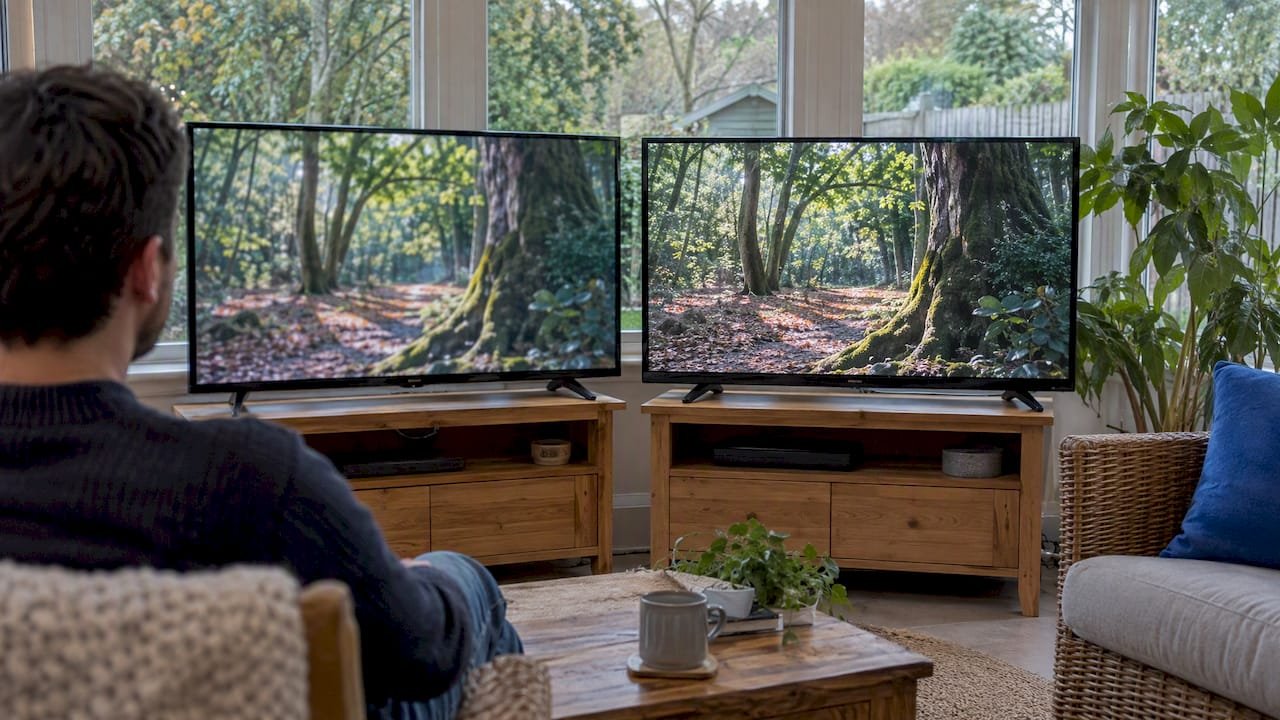
FHD (Full HD) is 1920×1080 pixels. HD, in everyday use, usually means 1280×720. That makes FHD 2.25 times as sharp on paper, and the gap is easiest to see on a larger TV, from a normal couch distance, on content with fine detail such as sports scoreboards, subtitles and film texture. On a phone or a small bedroom screen, you may struggle to tell the two apart.
The catch is that “HD” is a loose label. It can mean more than one thing, so the number matters more than the badge. This guide explains the labels, shows where the difference matters, and gives you a checklist for what to ask any TV or streaming service before you pay.
TL;DR
- FHD = 1080p = 1920×1080. Standard HD is usually 720p, or 1280×720. FHD has 2.25 times the pixels.
- “HD” is an umbrella term. A listing that says only “HD” could mean 720p, 1080i or 1080p, so ask for the real resolution and frame rate.
- FHD pays off most on screens of about 40 inches and up, on sports, subtitles and movies. It matters less on small screens.
- The source limits the picture. A great panel cannot add detail that was never sent, and a weak connection can erase the FHD advantage.
- For most US households, FHD is the sensible default when your device and connection support it. HD still makes sense for older devices, small screens and tight data limits.
Table of Contents
- What HD and FHD actually mean
- Why “HD” is not one format
- Can you actually see the difference?
- FHD vs HD for live sports
- When HD is the better choice
- Does FHD cost more to run?
- How to check what a streaming service really delivers
- Our perspective: resolution is a promise, delivery is the proof
- Try FHD, HD and 4K on your own screens
- Quick decision guide
- FAQ
- Sources
What HD and FHD actually mean
Resolution is the number of pixels across and down the screen. As 9to5Google explains, a 1920×1080 display has 1,920 pixels along the long side and 1,080 along the other. Every label in this conversation is shorthand for a pair of numbers like that.
| Label | Pixel dimensions | Also called | Total pixels (approx.) |
|---|---|---|---|
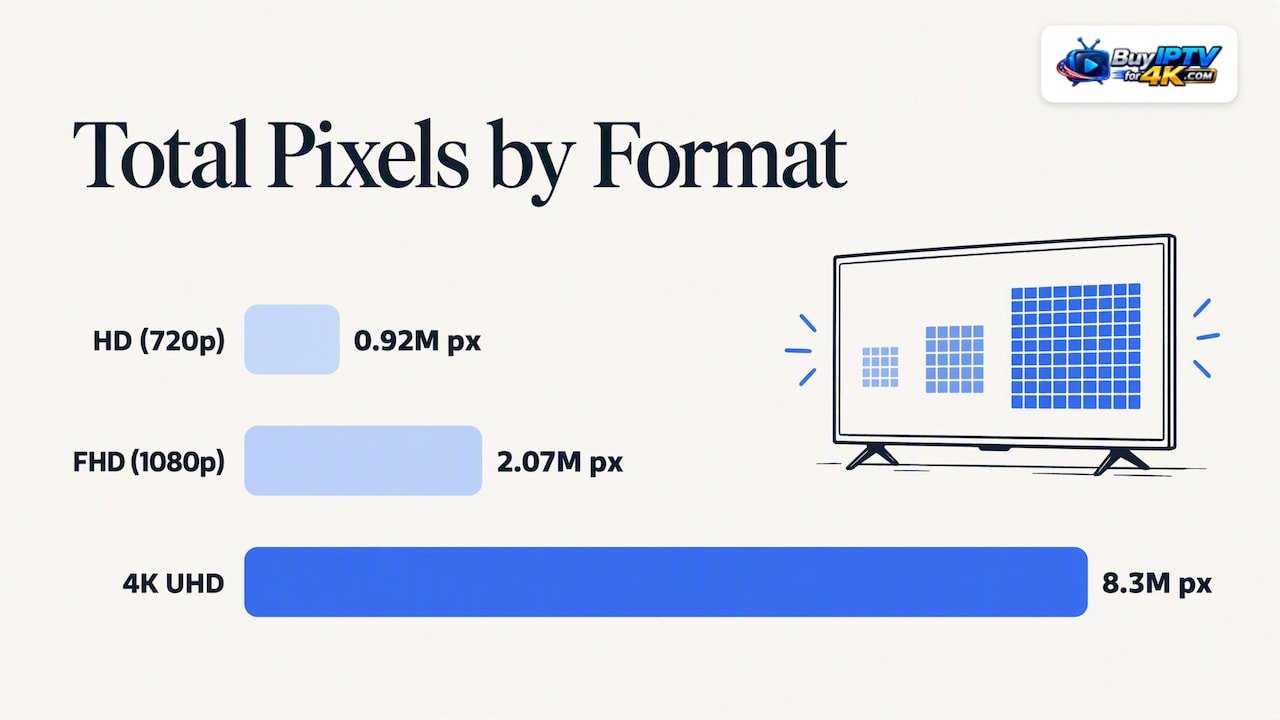
| HD | 1280×720 | 720p | 0.92 million |
| FHD | 1920×1080 | Full HD, 1080p | 2.07 million |
| 4K UHD | 3840×2160 | UHD, 2160p | 8.3 million |
The 4K and FHD pixel counts match the figures in this resolution comparison, which puts 4K at roughly 8.3 million pixels against 2.1 million for FHD. The 720p figure is simple multiplication: 1280 times 720.
That multiplication also settles a common claim. Some guides say FHD has “twice” the pixels of HD. CTL describes it that way, but for standard 1280×720 against 1920×1080 the exact ratio is 2.25. Against the 1366×768 panels common on budget laptops it is closer to 2 times.
Is FHD the same as 1080p?
In the usual 16:9 shape, yes. Computer Hope defines FHD as 1920×1080 with a 16:9 aspect ratio, and notes that most people know it as the 1080p used on HDTVs. The “p” stands for progressive scan, which matters more than it looks, and we come back to it below.
One wrinkle: phones. Labels like FHD+ often describe a taller or wider 1080-class screen, such as 2220×1080 or 2400×1080. 9to5Google points out that manufacturers use these suffixes across different aspect ratios, so the width-by-height numbers tell you more than the suffix does. On a TV, you will rarely run into this.
Why “HD” is not one format
Here is the part most comparison pages skip. The IEEE’s technology overview describes HD as a family of formats, including 1280×720 progressive and 1920×1080 in either interlaced or progressive form. So 1080i, which is 1920×1080 but interlaced, is technically HD too.
The US broadcast rules work the same way. The FCC’s original digital TV order did not impose a single scanning format, aspect ratio or line count. And the production standard, ITU-R BT.709, defines parameters for HDTV production and international programme exchange rather than one consumer label.
In practice, that means:
- A channel marked “HD” might be 720p, 1080i or 1080p.
- Laptop listings often use “HD” for 1366×768, which is neither 720p nor 1080p.
- “FHD” is the tighter term. If a service says FHD, you can reasonably expect 1920×1080, and you should still ask whether it is progressive.
So the useful question is not “HD or FHD?” but “what exact pixel dimensions, scan type, frame rate and bitrate will I receive?”
Interlaced vs progressive: the small letter that matters
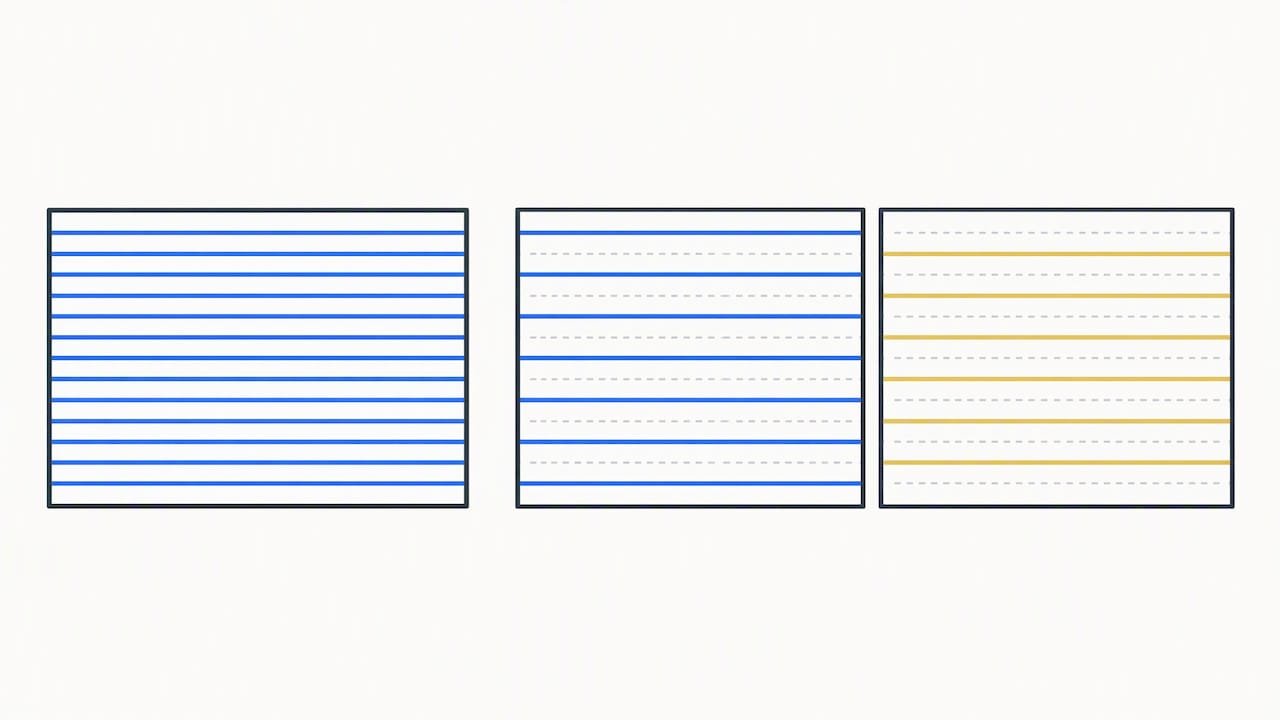
Progressive scan (p) delivers every line of each frame at once. Interlaced scan (i) sends odd and even lines in alternating passes. The IEEE overview distinguishes the two, and progressive is generally the better choice for fast action such as sports, because the whole frame arrives together.
This explains an old US quirk. An older consumer column noted that some networks broadcast in 720p while others use 1080i, and that a 1080-capable TV does not help when the broadcast is 720p. Network practices can change, so treat that as background rather than a current chart. The lesson holds: a higher-resolution TV displays what it is fed.
Can you actually see the difference?
It depends on three things: screen size, viewing distance and content.
Screen size
The same number of pixels spread over a bigger panel looks softer. On a 24-inch monitor you sit close to, 720p already looks passable and 1080p looks crisp. On a 55-inch living room TV, 720p looks noticeably soft at normal distances, and FHD holds up much better. CTL’s guidance says more pixels give a clearer, crisper image, especially on larger screens. It also calls 1366×768 adequate for basic tasks like email and writing, and 1920×1080 better for graphics, data-heavy work and primary-computer use.
Viewing distance
Sit far enough back and your eyes cannot resolve individual pixels, so extra resolution is wasted. Sit close and every pixel counts. The US Department of Energy’s display research lists screen size and viewing behavior among the factors that shape the display experience. In a typical living room with a large TV, you are close enough for FHD to show.
Content
Some material hides the gap. A talk show or a news desk on a small screen looks fine in 720p. Other material exposes it:
- Sports. Field markings, ball tracking, jersey numbers and on-screen stats are small, high-contrast details. FHD keeps them readable.
- Subtitles. Thin white text on a moving background is cleaner at 1080p.
- Movies. Skin texture, fabric, foliage and dark scenes carry more fine detail at 1080p.
- Animation and cartoons. Flat colors and hard edges hide low resolution, so the gap is smaller.
FHD vs HD for live sports
Sports is where the label matters and where it misleads most. Resolution is only one of several things that decide whether a match looks good.
- Resolution. 1080 lines show more detail than 720 lines on the same screen.
- Scan type. Progressive generally handles fast motion better than interlaced.
- Frame rate. Higher frame rates make motion smoother. The service should state it.
- Compression and bitrate. Heavy compression smears grass, crowds and fast pans, even on a 1080p stream.
- Connection stability. A stream that keeps dropping to a lower quality or buffering is worse than a steady 720p.
The BT.709 recommendation is the HDTV production and exchange standard, and the lesson from it is that picture quality starts before your display. A high-resolution panel cannot make up for a low-quality source, aggressive compression, poor deinterlacing or unstable delivery. So “1080p” on a listing is a starting point, not a guarantee.
When HD is the better choice
FHD is not always the right call. Choose 720p HD when:
- You have a data cap. Higher resolution uses more data per hour. If your home internet plan has a monthly limit, or you stream on a mobile hotspot, HD stretches it further.
- Your internet is slow or shared. A smooth 720p picture beats a 1080p picture that stalls. If several people stream at once, lower the quality on the less important screens.
- Your device is older. Some older tablets, sticks and smart TVs struggle to decode 1080p smoothly.
- The screen is small. On a phone or a compact kitchen TV, the extra detail is hard to see.
- The source is only 720p. Upscaling cannot create detail that was never in the picture.
Choose FHD when you have a TV of about 40 inches or more, a stable connection, a recent streaming device, and you care about sports, subtitles or film detail. For a household with a mix of screens, FHD on the main TV and HD on the rest is a sensible setup.
Does FHD cost more to run?
Not in a way that should drive your decision. The US Department of Energy’s guidance on buying efficient televisions points to screen size, LED-backlit LCD technology, automatic brightness control and ENERGY STAR certification, which includes a 1-watt limit on standby power. Its example table shows annual use of 168 kWh and about $18 a year for one efficiency level, against 235 kWh and about $26 for a less efficient one. Those are example efficiency levels, not HD or FHD figures. If power use matters, compare the EnergyGuide or ENERGY STAR data for the specific model, and keep the brightness setting sensible.
How to check what a streaming service really delivers
Before you subscribe to any live TV or IPTV service, put these questions to the provider, and test the answers yourself:
- What is the actual resolution of the channels I care about? “HD” alone is not an answer. Look for 720p, 1080i or 1080p.
- Is it progressive or interlaced? This matters most for sports.
- What frame rate? 25 or 30 versus 50 or 60 frames per second changes how motion looks.
- How many streams can run at once? Quality drops when a connection is shared.
- Which devices are supported? Check your own TV, stick or box specifically.
- Is there a way to test it? Watch a live match and a movie with subtitles at your normal viewing distance before committing to a long plan.
- Who do I contact when it stutters? Support hours and response matter more than a spec sheet.
Then check your own side. Make sure your TV or player is set to output 1080p. Use a wired connection or a strong Wi-Fi signal, and keep the streaming device close to the router. Restart the device if the picture drops in quality. Our smart TV setup guide walks through the setup step by step.
If you are comparing providers more broadly, our guides to choosing an IPTV provider and what to consider in a US provider cover the questions beyond resolution. If you are weighing FHD against 4K as well, see what to know before choosing a 4K streaming service.
Our perspective: resolution is a promise, delivery is the proof
We run an IPTV service for viewers in the UK and USA, and the questions we hear most are rarely about pixels. They are about freezing. People want the match to stay smooth in the final ten minutes, and they want to find a movie without hunting through menus.
That shapes how we think about FHD and HD. A 1080p label on a stream that stutters is a worse experience than a steady 720p one. So we build around fast, reliable servers and anti-freezing technology first, and then offer a mix of 4K, FHD and HD quality so each screen in a home can get what it can handle. Your living room TV can run the sharpest option it supports. A tablet, an older box or a weaker connection can drop a step without drama.
We would also tell you not to trust any one word on a listing, ours included. Test it. Pick a live game, a film with subtitles and a busy night, and watch at your usual distance. If setup is the stumbling block, we provide step-by-step installation help, and our support runs 24/7, because the first evening is when most problems show up.
The short version for a US household: choose FHD for the big screens where you notice detail, keep HD in your pocket for small screens and slow connections, and judge a service by how it behaves on a Saturday night, not by the badge.
— AHMED
Try FHD, HD and 4K on your own screens
Our service covers live channels, sports, movies, series and a large video-on-demand library in 4K, FHD and HD, on all major devices. You can browse what is included in our channels list first. Plans on our site are priced as follows:
| Plan | Price |
|---|---|
| 1 month | $14 per month |
| 3 months | $32 per quarter |
| 12 months | $69 per year |
A 6-month plan is also listed on the site. Check the page for its current price. If you are new to IPTV, start with the plan that gives you enough time to test live sports and a few movies on every screen you plan to use.
Quick decision guide
| Your situation | Best pick |
|---|---|
| 50-inch or larger TV, stable broadband | FHD (or 4K if your TV and connection support it) |
| Watching mostly sports and movies | FHD, progressive where possible |
| Phone or small tablet | HD is usually enough |
| Data cap or hotspot | HD |
| Several people streaming at once | FHD on the main TV, HD on the others |
| Older streaming stick or smart TV | HD, then test FHD |
If your answers point both ways, start with FHD on your main screen and step down only if you see buffering. Dropping a quality level is a thirty-second change. Buying new hardware is not.
FAQ
Is FHD better than HD?
For picture detail, yes. FHD is 1920×1080 against 1280×720 for standard HD, so it carries 2.25 times as many pixels. The advantage is clearest on larger screens and with sports, subtitles and movies. On a small screen or a weak connection, a stable HD stream can look better than a struggling FHD one.
Is FHD the same as 1080p?
In the usual 16:9 format, yes: FHD means 1920×1080, which is what 1080p describes. The “p” means progressive scan. Be careful with 1080i, which has the same pixel count but is interlaced, and with phone labels like FHD+, which can mean a taller or wider screen such as 2400×1080.
What does “HD” mean on a TV channel listing?
It is not one fixed format. HD covers 720p as well as 1080i and 1080p, so a listing that says only “HD” does not tell you the resolution. Ask the provider for the actual resolution, frame rate and whether it is progressive or interlaced.
Do I need FHD if I already have a 4K TV?
A 4K TV will play FHD content and scale it up, but it cannot add detail that was never in the source. FHD is a good, reliable level for most live TV. Choose 4K content where it is available, your connection can carry it, and the screen is large enough to show the benefit.
Does FHD use more internet data than HD?
Yes. Higher resolution generally needs more bandwidth, so FHD uses more data per hour than 720p HD. If you have a monthly data cap, stream over a hotspot, or share a slow connection, lowering the quality setting is the simplest fix. Ask your provider for the typical bitrate of the streams you plan to watch.
Sources
- What HD, FHD, QHD, and UHD really mean for your phone, 9to5Google
- Full HD (FHD) vs HD screen resolution, CTL
- What is FHD (Full High Definition)?, Computer Hope
- High Definition (HD), IEEE Technology Navigator
- FCC order on advanced television systems
- ITU-R BT.709, HDTV parameter values
- On 720p, 1080i, etc., LancasterOnline
- Display Energy Use in Homes, US Department of Energy
- Purchasing Energy-Efficient Televisions, US Department of Energy