
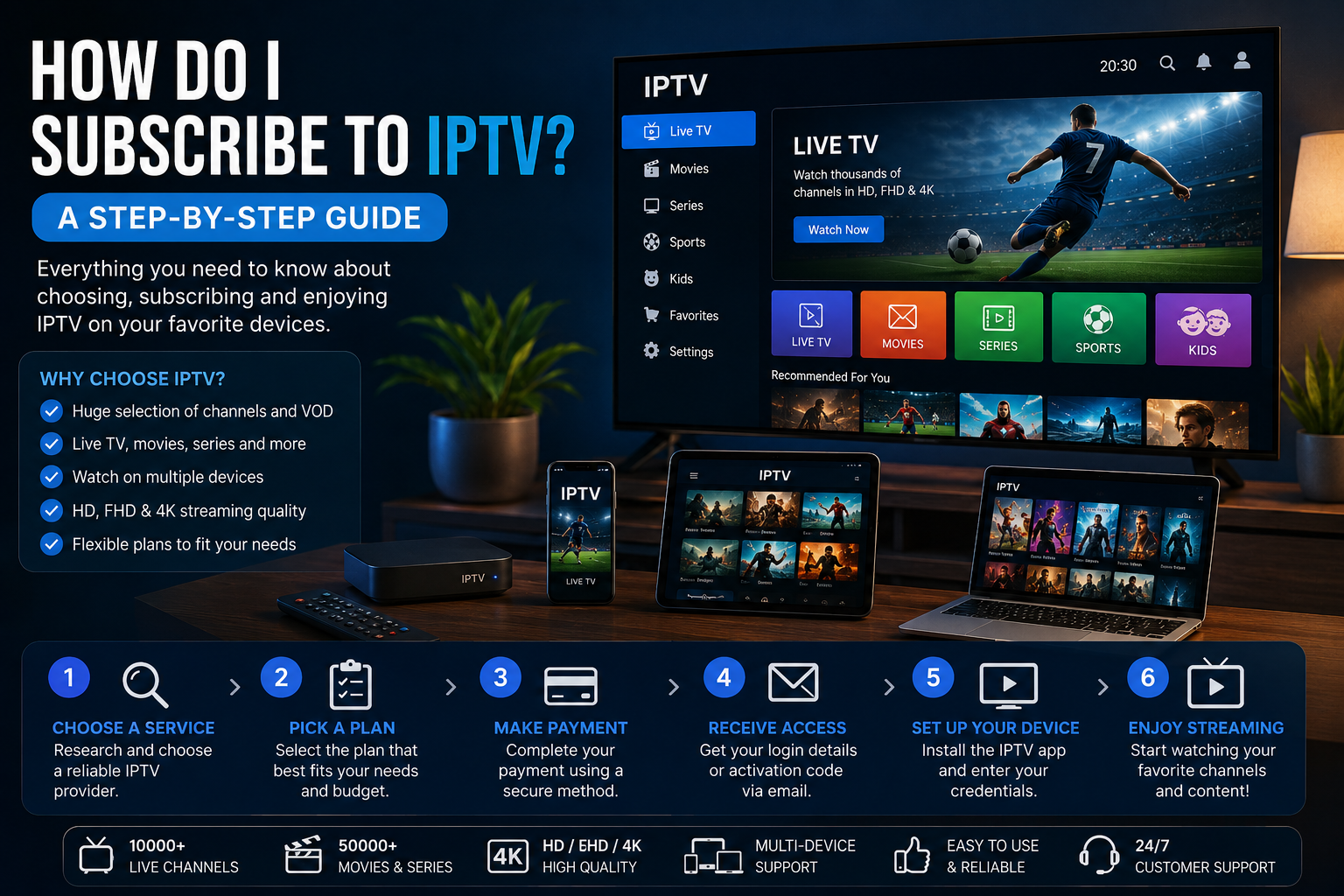
If you are searching for how do I subscribe to IPTV, you may be looking for a simple way to understand how IPTV subscriptions work and what you should check before choosing a service.
IPTV delivers television content through an IP-based network, allowing compatible devices to receive video through an internet connection. However, choosing an IPTV service should involve more than comparing prices or channel numbers.
Before subscribing, it is important to consider device compatibility, internet requirements, payment conditions, renewal policies, security, and whether the provider is authorized to distribute the content it offers.
This guide explains how to subscribe to IPTV and the main factors to consider before completing your purchase.
What Is IPTV and How Does It Work?
IPTV stands for Internet Protocol Television. It describes the delivery of television programming through an IP-based network rather than relying exclusively on traditional cable, satellite, or terrestrial broadcasting.
A typical IPTV setup can include:
- A legitimate IPTV provider
- A stable internet connection
- A compatible television, smartphone, tablet, or computer
- A supported application or platform
- An active subscription or authorized access
When you select a program, the relevant video data is transmitted through the network to your device. Your application then processes the stream and displays it on your screen.
The quality of playback can depend on your internet connection, Wi-Fi stability, device performance, network congestion, application performance, and the quality of the video source.
Is IPTV Legal and Safe to Use?
IPTV technology itself is not illegal. The important issue is whether a particular service has the necessary authorization to distribute the content it provides.
Before subscribing, research the provider and look for clear information about its service.
You should be able to find information about:
- Subscription pricing
- Available plans
- Supported devices
- Payment methods
- Cancellation conditions
- Renewal policies
- Refund policies
- Customer support
- Content authorization
You should also be careful with websites that make unrealistic claims or hide important subscription conditions.
For additional consumer guidance about online subscriptions, the Federal Trade Commission’s subscription advice explains why consumers should check renewal terms, cancellation procedures, and charges before signing up.
What Do You Need Before Subscribing to IPTV?
Getting started with IPTV generally does not require complicated equipment.
Before subscribing, check that you have the following.
A Reliable Internet Connection
IPTV relies on internet connectivity, so a stable connection is important for consistent playback.
The FCC notes that internet access with sufficient speed and reliability is necessary for streaming video services.
A Compatible Device
Depending on the provider, you may be able to watch IPTV using a Smart TV, streaming device, smartphone, tablet, laptop, or desktop computer.
A Supported Application
Some services provide their own applications, while others work with compatible applications on supported platforms.
An Active Subscription
You need authorized access to the service before watching its available content.
A Supported Payment Method
Check the payment options offered by the provider and review the full terms before completing the transaction.
How Do I Subscribe to IPTV?
If you are asking how do I subscribe to IPTV, the process can generally be divided into several steps.
Choose a Legitimate IPTV Service
Start by researching the provider instead of immediately selecting the cheapest option.
Look for a service that clearly explains its subscription plans, supported devices, payment conditions, customer support, and content authorization.
You should understand exactly what you are purchasing before providing payment information.
You can visit the Buy IPTV for 4K website to learn more about the site’s available IPTV information and services.
Check Device Compatibility
Before purchasing a subscription, confirm that your preferred device is supported.
Depending on the provider, IPTV may work with:
- Smart TVs
- Android TV
- Fire TV devices
- Apple TV
- iPhone
- iPad
- Android smartphones
- Tablets
- Windows computers
- Mac computers
Support varies between providers, so always check the current compatibility requirements.
Compare Subscription Plans
Do not compare IPTV plans based only on their advertised price.
Consider:
- Subscription duration
- Included features
- Available content
- Supported devices
- Video quality
- Application support
- Customer service
- Cancellation conditions
- Renewal terms
A slightly more expensive plan may offer better value if it better matches your requirements.
Review Payment and Renewal Terms
Before completing a purchase, carefully read the payment and renewal information.
Find out whether:
- The subscription renews automatically
- The displayed price is promotional
- Additional fees apply
- Refunds are available
- Cancellation is possible
- The payment process is secure
The FTC recommends checking the terms of a subscription before signing up and understanding how and when cancellation works.
If a subscription automatically renews, make sure you know the renewal date and expected charge.
Complete Your Subscription
Once you have chosen an appropriate service and reviewed its terms, complete the purchase through the provider’s official website or authorized payment process.
After payment, you may receive:
- Login credentials
- An activation code
- Account information
- Application instructions
- Setup information
Keep your account information private and avoid sharing login credentials publicly.
Set Up IPTV on Your Device
The setup process depends on your provider and device.
In general, you may need to:
- Install the supported application.
- Open the application.
- Enter your authorized account or activation information.
- Allow the application to load available content.
- Test playback.
Always follow the provider’s official setup instructions and use trusted application sources.
Which Devices Can You Use With IPTV?
One of IPTV’s useful features is that compatible services can work across a variety of connected devices.
Depending on the provider, supported devices may include:
- Smart TVs
- Android TV devices
- Fire TV devices
- Apple TV
- iPhones
- iPads
- Android smartphones
- Tablets
- Windows PCs
- Mac computers
Internet-connected televisions and streaming devices can provide access to online video content, although the exact services and applications available vary by device and provider.
Always check whether your specific device and operating system are supported before purchasing a subscription.
How Much Internet Speed Does IPTV Need?
Internet speed can have a significant effect on IPTV playback.
As a general guideline:
- SD: Around 5 Mbps
- HD: Around 10 Mbps or more
- Full HD: Around 10–15 Mbps or more
- 4K: Around 25 Mbps or more
These figures are general recommendations rather than guarantees.
A fast connection does not automatically prevent buffering. Wi-Fi interference, network congestion, router performance, device limitations, and problems affecting the video source can also influence playback.
For high-resolution content, a stable connection is particularly important.
How to Choose the Right IPTV Subscription
Choosing the right IPTV subscription requires looking at several factors.
Content Selection
Check whether the service offers the type of programming you want and whether the provider is authorized to distribute that content.
Device Support
Make sure your preferred Smart TV, smartphone, tablet, streaming device, or computer is supported.
Video Quality
If high-quality video is important to you, check whether the service supports the resolution you need, such as HD, Full HD, or 4K.
Reliability
Look for transparent information about the service and available customer support.
Remember that your own internet connection can also affect streaming performance.
Pricing
Compare the complete cost of each subscription rather than focusing only on a promotional price.
Cancellation and Renewal
Read the terms carefully so that you understand what happens when your subscription expires.
Automatic renewal can be convenient, but you should know exactly when and how you will be charged.
Security
Use reputable websites and protect your account information.
Avoid providing unnecessary personal or payment information to unfamiliar websites.
IPTV vs Traditional TV
IPTV and traditional television mainly differ in how content is delivered.
Traditional TV may use cable, satellite, or terrestrial broadcasting, while IPTV uses IP-based networks and internet connectivity.
IPTV may be convenient for viewers who prefer internet-connected devices, while traditional television can remain useful for people who prefer conventional broadcast or cable services.
When comparing the two options, consider:
- Content availability
- Internet requirements
- Equipment
- Subscription costs
- Picture quality
- Reliability
- Viewing preferences
The right choice depends on your individual requirements.
Common IPTV Subscription Problems
Even after choosing a legitimate service, you may occasionally encounter technical problems.
Buffering During Playback
Buffering can result from unstable internet, weak Wi-Fi, network congestion, device limitations, or issues with the content source.
Check your internet connection first and restart your router or application if necessary.
Channels or Programs Not Loading
If content does not load, check that your subscription is active and that your account information is correct.
If the problem continues, contact the provider’s official support team.
Device Compatibility Issues
An IPTV application may not support every Smart TV or operating system.
This is why checking compatibility before subscribing is important.
Poor Video Quality
Video quality can depend on your internet connection, device, application, network conditions, and original video source.
Login Problems
If you cannot access your account, check your credentials carefully and verify that your subscription is still active.
If you continue to experience problems, use the provider’s official support channel.
Frequently Asked Questions
Can I Use IPTV on a Smart TV?
Yes. Many legitimate IPTV services support Smart TVs.
However, the exact compatibility depends on the provider and your television’s operating system.
Always verify compatibility before purchasing.
Can I Watch IPTV on iPhone?
Yes. IPTV can be watched on an iPhone using a compatible application and an authorized IPTV service or stream source.
The exact setup depends on the provider and application.
Do I Need Fast Internet for IPTV?
A stable internet connection is important for IPTV, particularly when watching HD or 4K content.
Higher-resolution video generally requires more bandwidth, while network stability can also affect playback.
How Do IPTV Subscriptions Work?
An IPTV subscription generally provides authorized access to television content for a specific period.
Depending on the provider, you may receive login credentials, an activation code, or instructions for accessing the service.
Your access continues according to the duration and conditions of the subscription plan.
Final Thoughts
Understanding how do I subscribe to IPTV is relatively simple when you know what to check.
Start by researching the provider and verifying that it is legitimate and authorized to distribute the content it offers. Then check device compatibility, compare subscription plans, review payment and renewal conditions, complete your purchase, and follow the official setup instructions.
Do not base your decision solely on price or the number of channels advertised. Content authorization, device compatibility, video quality, internet requirements, customer support, pricing, and clear cancellation terms are all important.
Before subscribing to any recurring service, it is also sensible to understand the renewal and cancellation conditions. The FTC recommends reviewing these details before signing up and keeping track of renewal charges.
For more information, visit Buy IPTV for 4K and explore the available IPTV resources.